| mboxly.app

Send a password, file or secret — encrypted, with an expiry date.

Instead of sending sensitive data by email or chat — generate a link that expires. The recipient just clicks, no account or app needed.

No account for recipient Expires automatically Encrypted in browser

Secure

Message

Encrypt text and attachments end-to-end, then share a protected link.

  • Encryption happens in your browser
  • The key is never sent to our server
  • Messages disappear automatically
  • No account required

Who is it for?

Your data, your keys. Discover real Zero-Knowledge security.

Secure transfer of sensitive data without compromise

mboxly.app is a modern tool created for secure sharing of sensitive information in a digital world. Whether you are sending a banking password, an API token, or a confidential company document, mboxly.app guarantees that no one - including us - can read your message.

The key to our system is client-side encryption. This means your data is secured directly in your browser before it even reaches the network. It is the simplest, fastest, and safest way to transfer data, without creating an account or installing software.

Illustration and technology

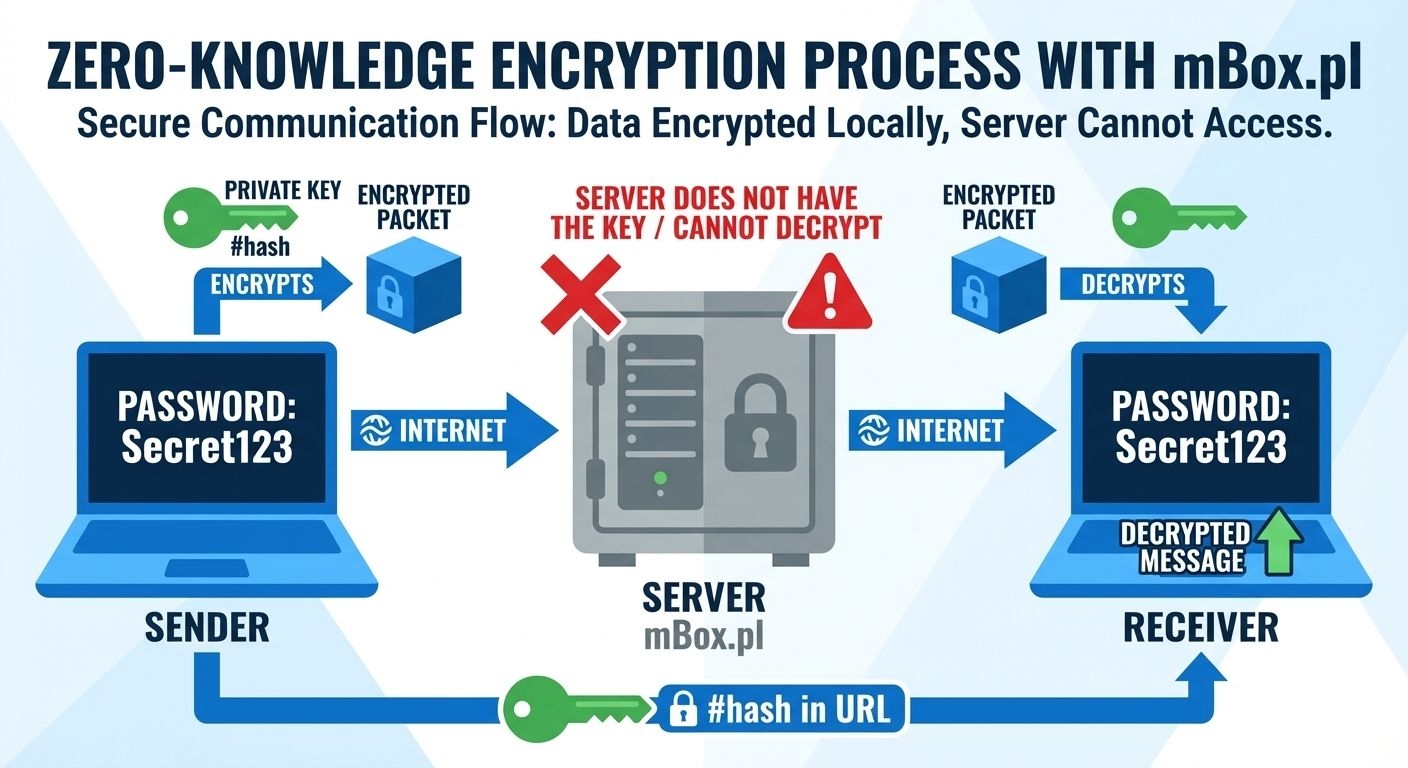
Below is a visual summary of the Zero-Knowledge model and the encryption process before data is sent.

Illustration of the Zero-Knowledge security model in mboxly.app

How do we work?

mboxly.app bases its security on the Zero-Knowledge model. In practice, this means the mboxly.app server is only a "blind courier". It receives an encrypted data package but never has the key required to open it. This key is generated locally by the sender and becomes part of a unique link (the fragment after #), which is never sent to our systems.

Encryption itself uses the banking-grade AES-256-GCM standard. This modern cryptographic algorithm guarantees confidentiality (no one can view the content) and integrity (no one can modify the message in transit). If anyone attempts to alter the encrypted payload, the recipient will not be able to decrypt it.

An additional layer of protection is the self-destruct rule. You can set the message to be permanently removed from the server according to selected rules.

This ensures that confidential information does not stay online a second longer than necessary, eliminating the risk of a later leak.

  • After first read (Burn after reading) Perfect for one-time password or token sharing. The recipient opens the link once and the message disappears.
  • After a specified time (e.g. 1h, 24h, 7 days) Useful for documents or access codes that should expire after a defined period.
Key benefits

Full privacy

With client-side encryption, your secret never reaches the server in readable form.

Speed and simplicity

Generate a secure link with one click. No registration and no email required.

Self-destruct policy

Full control over data lifetime. Data disappears permanently.

AES-256-GCM

Banking-grade encryption standards protect your message from tampering.

No ads, no tracking

mboxly.app is a security tool. We do not profile users and we do not track activity.

From the Blog

Practical notes on privacy, secure sharing, and zero-knowledge

A small reading block for people who want to understand how the product works in real scenarios before using it.

Browse all articles

Questions

Frequently Asked Questions

Short answers to the questions people usually ask before trusting a secure-link workflow.

Why mbox

Send sensitive data without leaving traces

Encrypt data directly in your browser and share it using secure links that expire automatically.

Security

Zero-knowledge

Only you and the recipient can read the message. We never have access.

Technology

Client-side encryption

Data is encrypted before it leaves your device.

Privacy

No tracking

No analytics, no profiling, no data collection beyond what is required.